ECM sync approach
The ECM model (based on encrypted files) allows the use of almost any syncing solutions. For instance, if you work on your laptop you may sync your vault records to/from any cloud storage, e.g. Dropbox or PCloud, and ECM built-in usage of rclone will allow you to sync files among your tools or application, e.g. sync files from Dropbox to your mobile phone. The ECM sync support the following forms of syncing your data:
- from cloud providers, e.g. Dropbox, pCloud, etc. (the support is limited to rclone capabilities);
- from any local or remote host using either local copy or SFTP/SSH feature (part of rclone capabilities);
- using local or remote HTTP server (part of ECM web server implementation). Below, we provide some details for specific use-cases. Please refer to individual section for more details.
Sync procedure using cloud based provider
There are many cloud based providers which you can use to store your data, e.g.Dropbox or pCloud. Luckily, ECM provides excellent support to sync your data from cloud based providers back to your app. There are two ways of syncing:
- from your local storage to cloud provider, this task can be done using native tools such as (rsync, or cloud based app);
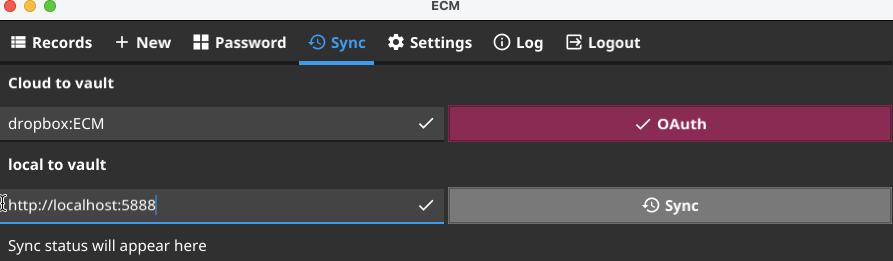
- from your cloud provider to your app (e.g. to your mobile device). For this please use ECM app sync menu where you can use the following methods:
cloud:/path, e.g.dropbox:ECM, feature allows you to authenticate with you cloud provider and sync your data from itlocal:/pathfeature allows you to use either local disk, HTTP server, or SFTP methods from remote node to your device, see sections below for more examples.
Sync via SFTP
The rclone provides ability to sync data over sftp
protocol. To enable it please locate your app rclone.conf file:
./ecm -prefs
/some/path/it/will/print
and over there you’ll find your rclone.conf file. Just add to it the
following section:
[sftp]
type = sftp
host = YOUR_HOST_NAME
user = YOUR_USER_NAME
pubkey_file = /YOUR_PATH/.ssh/id_ecdsa.pub
privatekey_file = /YOUR_PATH/.ssh/id_ecdsa
md5sum_command = md5 -r
sha1sum_command = none
shell_type = unix
Please replace parts started with YOUR to your values. You will also need to
generate proper id_ecdsa files as following:
ssh-keygen -t ECDSA
and place your ecdsa public file to your host. Fore more information you may search on google how to do it or look at this manual.
Then, test your ssh connection with your ecdsa key to ensure that you can access remote host.
After these steps you may use your sftp method in ECM app. Just visit
settings page and enter into your local|http|sftp field:
sftp:/path/to/ECM
Where /path/to/ECM is a path to your ECM area which will be used for sync’ing
records to your app.
Sync procedure using Local HTTP server
To perform sync of your ECM application, e.g. mobile phone or native macOS app, with local HTTP server we need to start HTTP server elsewhere, e.g. on a localhost. This can be done as following:
# login to your machine and run
./ecm -config server_config.json

# verify that you can connect to your server by using curl
curl "http://localhost:5888/vault/Primary/records?id=true" | jq
Now, switch to your ECM application and provide proper input to your local URI
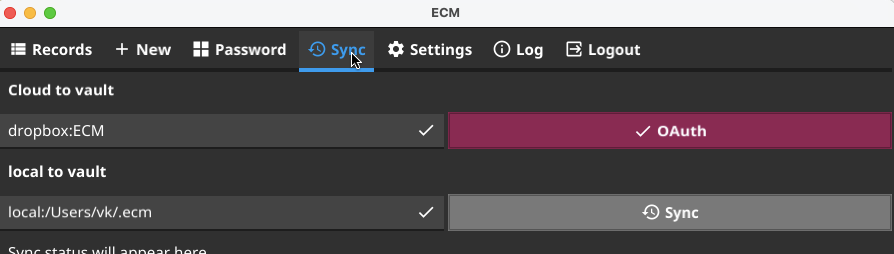 ,
then adjust the sync URI to
,
then adjust the sync URI to http://localhost:5888 (the default host:port of your server) and click Sync,
e.g.